150+ Best Midjourney YouTube Thumbnail Prompts (Copy-Paste 2026)
Why Midjourney v6 is the King of Thumbnails in 2026
Welcome to 2026, where the "average" visual is no longer enough to get a click. As the YouTube algorithm becomes more sophisticated at understanding visual quality, creators are turning to Midjourney v6 to stay ahead. The level of photorealism, character consistency, and composition control available today is unprecedented.
However, the biggest hurdle remains prompt engineering. Most creators still use basic prompts and wonder why their thumbnails look like "AI art" rather than "YouTube masterpieces." In this guide, we provide over 150 proven prompts that you can copy and paste directly into Midjourney to boost your Click-Through Rate (CTR).
Before we dive into the prompts, remember that you can always paste these into the ThumbPrompt Generator to add even more cinematic detail or customize them for your specific face!
Gaming & Esports Prompts
Gaming thumbnails need to scream excitement and intensity. In 2026, the trend has shifted from messy collages to high-focus, character-driven shots with "Glow Effects" and "Dynamic Depth."
First-person perspective of a hacker in a dark room with glowing blue holographic screens, typing on a mechanical keyboard with RGB lighting, intense atmosphere, volumetric lighting, unreal engine 5 render, 8k --ar 16:9 --v 6.0
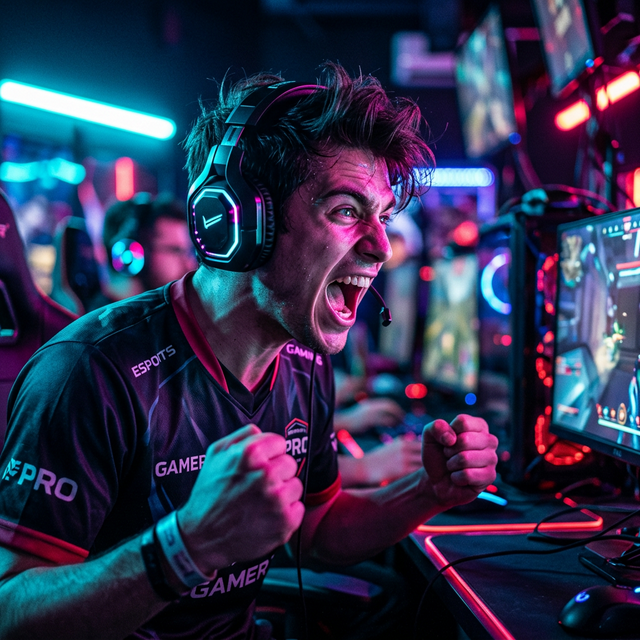
Extreme close up of a professional gamer wearing a high-tech headset, screaming in victory, face lit by red and cyan neon lights from the monitor, sweat on face, ultra-detailed skin textures, bokeh background of a gaming arena, cinematic shot --ar 16:9 --stylize 250 --v 6.0
Using ThumbPrompt for gaming allows you to specify "Neon Vibe" or "Esports Style" which automatically adds the necessary color grading keywords that Midjourney sometimes misses.
Tech Reviews & Tutorial Prompts
Tech content requires clarity and a premium feel. You want your viewers to feel like they are looking at the future. Think Apple-style lighting mixed with futuristic UI elements.
A person holding a transparent glowing smartphone of the future, floating interface elements, clean white studio background, minimalist aesthetic, soft studio lighting, sharp focus on the device, 8k resolution, photorealistic --ar 16:9 --v 6.0
A laptop screen displaying complex matrix code and AI neural networks, a glowing robot hand reaching out from the screen, dark futuristic office setting, cinematic lighting, sharp details, high contrast --ar 16:9 --niji 6
For more tech-specific prompts, read our ChatGPT prompts for YouTube thumbnails guide for a repeatable framework you can adapt to any niche.
Fitness & Lifestyle Prompts
Fitness thumbnails are all about transformation and emotion. In 2026, 'Gritty Realism' is outperforming 'Smooth Perfection.'
Split screen style but in a single shot, a muscular man lifting heavy dumbbells, extreme facial expression of effort, dramatic side lighting creating deep shadows (chiaroscuro), sweat droplets flying off, gritty texture, high contrast black and white with a touch of orange --ar 16:9 --v 6.0
Don't forget to use ThumbPrompt to ensure your fitness prompts include "Volumetric Lighting" to make those muscles really pop off the screen.
Storytelling & Documentary Prompts
Channels like SunnyV2 or MagnatesMedia have changed the game. Their thumbnails look like million-dollar movie posters.
An old abandoned mansion at night under a full moon, ominous fog creeping along the ground, a single mysterious figure in a trench coat silhouetted in a lit window, cinematic horror aesthetic, 8k, dark mood --ar 16:9 --v 6.0
A man in a bespoke suit walking away from a private jet, golden hour lighting, cinematic lens flare, luxury aesthetic, blurred background of a private runway, 'Success' magazine style --ar 16:9 --v 6.0
Build your own custom Storytelling prompts for free.
Go to Generator →arrow_forwardHow to Optimize Your Midjourney Outputs
Generating the image is only half the battle. To truly win on YouTube, you need to follow these three rules:
- Aspect Ratio: Always use
--ar 16:9. YouTube thumbnails are 1280x720, so Midjourney needs to generate in that landscape format. - Stylize Parameter: Use
--stylize 250for a more "realistic" look and--stylize 750if you want something more artistic and "AI-looking." - Upscaling: Always use the 'Creative Upscale' feature in Midjourney to add that final layer of crispness.
If you're finding these parameters confusing, just use ThumbPrompt's builder. It handles the technical flags for you automatically.
Conclusion & Final CTR Tips
The world of YouTube in 2026 is visual-first. By using these 150+ prompts, you are already ahead of 99% of creators who still use Canva templates. Remember to keep your subjects large, your colors high-contrast, and your composition simple.
Paste any of these prompts into ThumbPrompt for an even better version that includes negative prompts (to avoid double heads or weird hands) and specialized lighting keywords!
Stay creative, keep experimenting, and we'll see you on the trending page.